Compatible with Chrome and Edge
Instruction Guide
We have a simple tutorial guide which explains the features of the software extension and what each button inside the extension does. Read our tutorial and welcome guide on how to use the extension to the fullest. Use all the features of this browser software.
If you are interested in other web extensions to install, you might wish to check out the Microsoft Bing Search with Rewards extension.
Microsoft Bing Search with Rewards Extension
It allows you to complete daily offers to get points.
Track the number of points you have currently and the rewards you can redeem with these points.
The ways to get points & get rewarded is search with Bing, browse with Microsoft Edge and shop at the Microsoft and Windows stores to earn rewards.
Sponsored Link:
Other useful extensions
Another extension which would be useful to install is the iCloud bookmarks extension.
It allows to keep your Chrome bookmarks on Windows synced up with the Safari bookmarks on your iPhone, iPad, and Mac.
iCloud will store your website bookmarks so it is accessible even on your iPhone and Mac.
Try these other two extensions and see if it will boost your daily productivity.
Read at double or triple your normal reading speed. Test your original reading speed. Use our software for 2 weeks and see how much faster you read online.
Train yourself to read faster once you download and install our speed reading software. Increase the rate at which you can absorb knowledge and grow smarter, use this free extension to help boost your reading speed today.
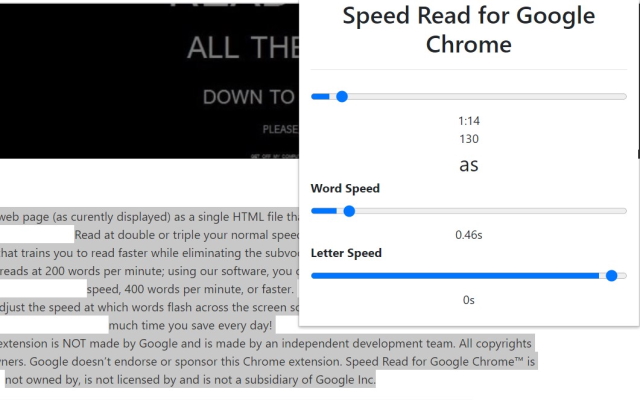
Our software allows you to adjust the speed at which words flash across the screen so that you naturally read faster. Think of how much time you save every day! Save hours each week by using our software extension to read any article you wish. Our software extension allows you to speed read at a pace you set and you can slowly boost your reading speed from 200 to 300 to 400 to 1000 words a minute at the end.
Features:
✔️ Efficient Training
What is speed reading?
Speed reading is the process of rapidly skimming through written material, attempting to grasp the general meaning without focusing on every word. It is a fundamental skill used when reading for information or comprehension.
Speed reading is also known as "reading for information" or "rapid information processing." It is a learned skill that does not come naturally to many people.
The average adult reads at about 200 words per minute (wpm), but some people can read at up to 1,000 wpm. However, this requires intensive training and practice.
How to improve your reading speed?
Speed reading is the ability to take in and comprehend information quickly.
How can you learn how to speed read? The best way is by practicing, but there are also a few tricks that will help you improve your speed.
The first step to taking in information quickly is learning how to skim through text. This means skimming the surface of the words and getting the gist of what they're saying without spending too much time on any one section.
The second step is using subvocalization — imagining each word as you read it out loud — so that you can slow down when necessary and still get the general idea of what's going on.
Finally, once you've mastered these two skills, practice reading faster by setting a timer for five minutes and reading as much text as possible during that time period. If you're already comfortable with skimming text, try setting goals for yourself like "read five pages in two minutes" or "read one page every 20 seconds."
Break up reading into smaller chunks. Try reading for 10 minutes at a time and then take a break for about 10 minutes before continuing your reading. This will help your brain focus on the task at hand and keep you from getting distracted by other thoughts or activities.
Practice reading in short bursts of time, such as while waiting in line at the grocery store or while standing in line at the bank. You can also try doing this while watching television or listening to music, which will help keep your mind occupied while practicing your speed-reading skills.
Read something easy first, like an article on a topic that interests you or an email from a friend or relative. This will help get your mind used to the idea of reading quickly without forcing yourself too much right away.
Another idea/method you can use is use ChatGPT to make a summary of the article/webpage you are on. So instead of reading faster, you just read a summary of the article instead to save time.
Tutorial:
- Install the Extension
- After installing the extension, click on the icon on the toolbar.
Sponsored Link: